 Grade Integrity
AI writing checks for Google Classroom
Know which assignments to read twice.
Grade Integrity reads every submission in a Classroom assignment, scores each one, and highlights the exact paragraphs and sentences that read like AI, right on the student's own document. Essays, lab reports, reading responses, short answers: whatever your students write, you'll know where to look before you grade.
- No card needed
- Read-only access to Classroom
- Reports delete themselves after 30 days


 Google Classroom
 Google Docs
Google Slides and Sheets
 Word files
 PDFs
Pasted text
Every subject
Any assignment your students write.
Grade Integrity isn't just for English class. If students write it in a Google Doc, Slides deck or Sheet, a Word file, a PDF or a Classroom answer box, it can check it.
English
Essays, literary analysis, book reports and journals.
Science
Lab reports, research summaries and explanations of results.
History and social studies
DBQs, research papers and source analyses.
Every class
Reading responses, reflections, exit tickets and short answers.
Checks work written in English. Longer answers give it more to go on, and a sentence or two is judged on its own scale.
How it works
A whole assignment, checked in three steps.
-
1
Sign in with Google
Use your school Google account. Grade Integrity asks for read-only access to your classes and the work students turn in. It can't change, grade or delete anything.
-
2
Pick the assignments
Choose a class and tick the assignments, on the website or with the Scan for AI button right inside Google Classroom.
-
3
Read the report
Every student, a verdict and a score, sorted so the submissions most worth a look come first. Close the tab while it runs; the report waits for you.
Chrome extension
Check any assignment, on any page.
A student's Google Doc, a Slides deck, Classroom's grading view or any web page: click Grade Integrity, or press Alt+Shift+G, and the verdict appears right over their work, with the passages worth a second look.
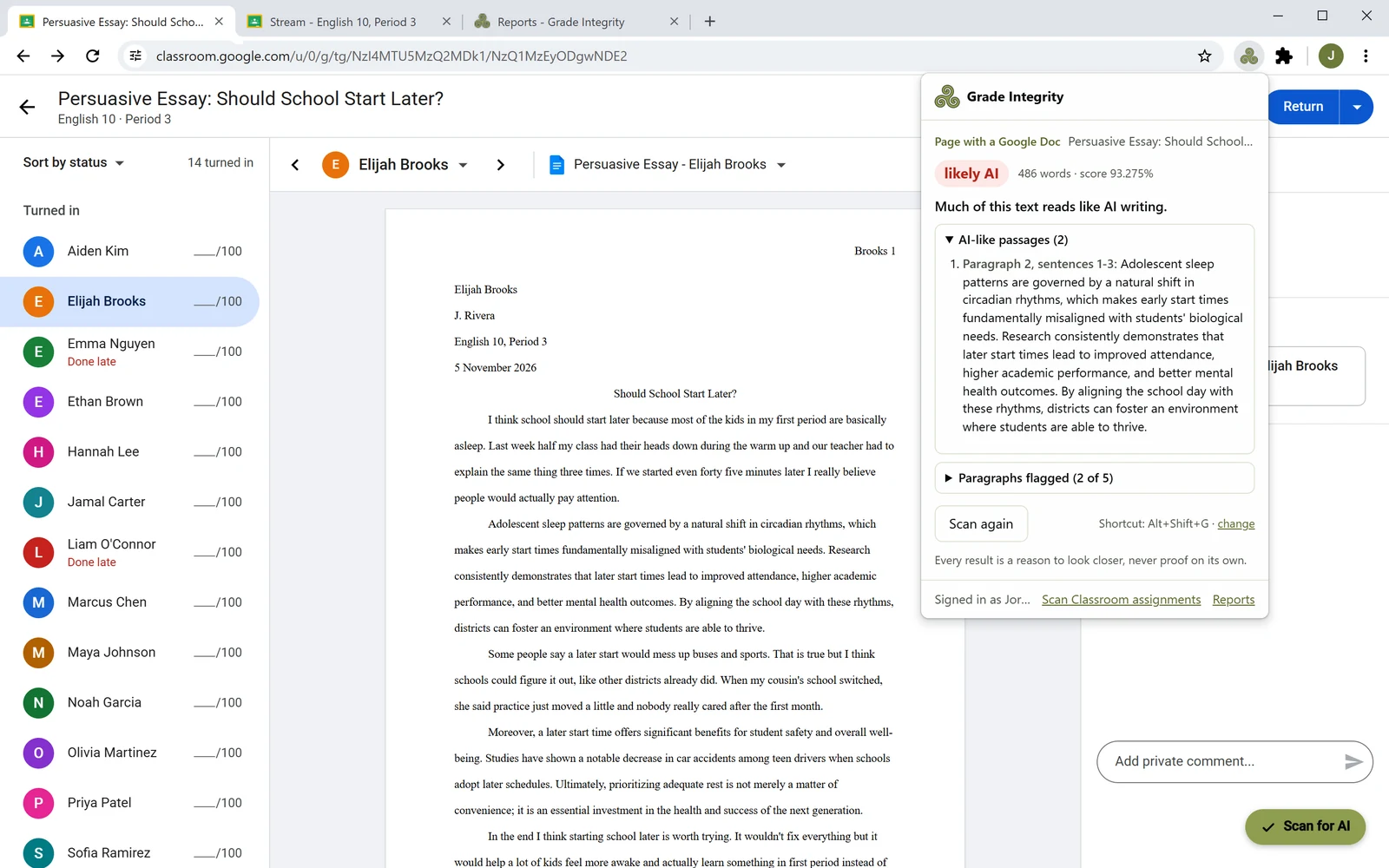
One click, any page
A verdict, a score and the AI-like passages for whatever you have open: a Doc, a deck or a web page.
Scan for AI, inside Classroom
A button on every class and assignment page checks whole assignments and opens the full report.
Reads only when you ask
Only the tab you click it on. Checking a page you have open saves nothing: no report, no copy.
Highlighted, not just scored
See exactly which parts read like AI.
A score on its own doesn't tell you much. Grade Integrity opens each student's own document, with its formatting intact, and highlights the passages that stood out, so you can read them in context.
- A score for each submission, and for every paragraph
- Sentence highlights that catch one pasted paragraph in otherwise original work
- Download the highlighted PDF to keep or to share with a colleague

As many assignments as you like
Check a whole class in one go.
Pick a class, tick the assignments and start. Search by title, see when each was posted and due, and choose whether to score every paragraph and highlight sentences.
- Every student gets a plain-language verdict, with the ones most worth a look at the top
- Only turned-in work is checked, and late work is marked
- Nothing turned in yet? It tells you, instead of an empty report

Reports that tidy up after themselves
Keep what you need. The rest disappears.
Reports hold your students' work, so they're deleted automatically after 30 days. Download the CSV for your records, or delete a report the moment you're done with it.
- Check uploaded Word, PDF and text files, or paste in any text
- One CSV per report, ready for your gradebook notes

Our promise
A reason to look closer. Never proof on its own.
No AI detector is perfect, and we won't pretend ours is. Grade Integrity shows its work, tells you how often it's wrong, and leaves the judgment to you, the person who knows the student.
Human-written work flagged as a whole, at most. That's where the cutoff is set, tested on real student writing.
Clean pieces of student writing that get a single highlight somewhere. That's why a highlight is a hint, not evidence.
Pieces of student work written to our logs. It's only kept inside your own reports.

Made for the way teachers work
It fits into your evening, not the other way round.
- A button inside Classroom. Our Chrome extension adds Scan for AI to Google Classroom, so you never copy and paste student work again.
- Or check the page you're on. Click the extension, or press its shortcut, on a student's Google Doc, a Slides deck or any web page. The verdict appears right there, and nothing is saved.
- Runs in the background. Start a scan, close the tab, and come back to a finished report.
- Tells you what it skipped. If nobody has turned an assignment in yet, it says so instead of leaving you guessing.
- Short answers too. Classroom short-answer questions are checked right alongside longer assignments.
Student privacy
Built for student data from the first line of code.
Student work is sensitive. Grade Integrity reads only what it needs, keeps it only as long as you need it, and never uses it for anything else.
Read-only Google access
It reads classes, assignments, submissions and the Google Docs, Slides and Sheets students turned in, plus any uploaded files you choose. It can't change, grade or delete anything.
Google access stays in memory
Your Google connection is held in the server's memory for about an hour at a time and is never written to a database.
Deleted after 30 days
Reports, and the copies of student work inside them, are deleted automatically. You can delete them sooner.
Only you see your reports
Reports belong to the teacher who made them. They're never shared, sold, or used to train anything.
Encrypted and hashed
Everything travels over HTTPS. Passwords are stored only as scrypt hashes. Card details go straight to Stripe.
Ready for your school's review
Read our privacy policy, or see what we offer schools for FERPA reviews and admin roll-outs.
Questions
What teachers ask us.
Is it only for essays?
No. It checks any written assignment in English, in any subject: essays, lab reports, research papers, DBQs, reading responses, reflections and Classroom short answers. Longer answers give it more to go on, and very short ones are judged on their own scale.
Can a student be accused of cheating because of this?
A Grade Integrity result should start a conversation, not end one. Every detector makes mistakes, and students who polish their writing with grammar tools are flagged more often. Use the highlights to decide where to look, then talk with the student, compare with their earlier work, or ask them about their draft.
Does it work with Google Docs, Slides, Word files and PDFs?
Yes. From Classroom it reads the Google Docs, Slides and Sheets students turn in, plus short-answer responses. When students upload Word, PDF or text files instead, you choose those files in Google's file picker before the check, and they're read too. Without Classroom, you can upload files, paste text, or use the Chrome extension to check a Google Doc, a Slides deck or a web page you have open. Multiple-choice questions and handwriting in scanned images have no text to check.
Do I need to be a Google Classroom user?
No. Sign up with an email and password and check uploaded files, pasted text, or a Google Doc or web page you have open, with the Chrome extension. Connect Classroom later whenever you like.
What can Grade Integrity see in my Google account?
Your classes, their assignments and submissions, class rosters (for student names), and Google Docs, Slides and Sheets, which it opens only for the work students turned in. Files students upload are opened only when you choose them in Google's file picker. Grade Integrity only reads, and sees nothing else in your Google Drive. Checking a page you have open with the extension doesn't use your Google account at all. See the privacy policy for the details.
What happens when my free trial ends?
Your reports stay open and you can still download them. To run new checks, subscribe from the pricing page. If you subscribe during the trial, you aren't charged until it ends.
Try it on your next assignment.
Free for 14 days. No card needed. Sign in with your school Google account and check a whole class in minutes.